Resources Center

Explore the SideSpeak Resources Center
Discover interactive tools, AI-powered utilities, integrations, learning resources, and productivity apps that help you get more from every SideSpeak meeting.
🚀 Meeting Tools
Discover AI assistants, collaboration tools, meeting preparation resources, follow-up utilities, and more.
🔗 Integrations
Connect SideSpeak with Google Calendar™, SideCue, Premium Tools, and other growing integrations.
📚 Help & Learning
Browse help articles, release notes, what's new, tutorials, and practical guides for getting the most from SideSpeak.
Everything in one place—from productivity tools and integrations to tutorials, release notes, interactive experiences, and AI-powered meeting resources.
Ready to Explore?
Featured Resources
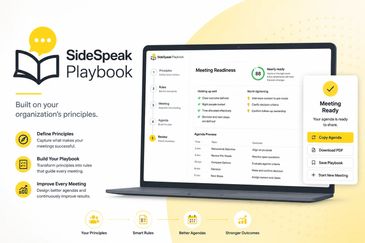
Build better meetings using your organization's principles.
Build better meetings using your organization's principles.
Build better meetings using your organization's principles.
SideSpeak Playbook helps organizations design better meetings by capturing the principles that define how they work best.
Instead of generating generic agendas, Playbook guides you through defining your organization's meeting philosophy, transforming those principles into practical rules, and creating agendas that align with your culture a
SideSpeak Playbook helps organizations design better meetings by capturing the principles that define how they work best.
Instead of generating generic agendas, Playbook guides you through defining your organization's meeting philosophy, transforming those principles into practical rules, and creating agendas that align with your culture and goals. Every meeting is designed with purpose, evaluated against your standards, and continuously improved through structured feedback.
Whether you're planning a strategic planning session, leadership meeting, project review, or team stand-up, SideSpeak Playbook helps ensure every meeting reflects your organization's way of working—resulting in clearer objectives, stronger decisions, greater accountability, and better outcomes.
Built on your organization's principles.
Define your principles. Build your playbook. Improve every meeting.

Take the Guesswork Out of Scheduling
Build better meetings using your organization's principles.
Build better meetings using your organization's principles.
Scheduling a meeting shouldn't require endless emails, text messages, or guessing what works for everyone. SidePlanner helps small groups collaborate on the best meeting time in one shared planning space, with automatic time zone conversion and optional multiple meeting choices.
Whether you're meeting with coworkers, clients, family, or fr
Scheduling a meeting shouldn't require endless emails, text messages, or guessing what works for everyone. SidePlanner helps small groups collaborate on the best meeting time in one shared planning space, with automatic time zone conversion and optional multiple meeting choices.
Whether you're meeting with coworkers, clients, family, or friends, everyone can quickly respond, suggest alternatives, and stay informed through email, text, or browser notifications. Once the meeting is finalized, SidePlanner automatically becomes your meeting hub with a SideSpeak meeting link, calendar options, meeting purpose, and everything participants need in one place.
Spend less time scheduling and more time meeting.
Long Documents, Explained Simply.
Build better meetings using your organization's principles.
Long documents can be overwhelming. Whether it's a contract, policy, research paper, or employee handbook, Get the Jist uses AI to quickly identify the key points and present them in a clear, easy-to-understand summary. You can also ask follow-up questions in plain English to explore the parts that matter most to you.
We built Get the Jist
Long documents can be overwhelming. Whether it's a contract, policy, research paper, or employee handbook, Get the Jist uses AI to quickly identify the key points and present them in a clear, easy-to-understand summary. You can also ask follow-up questions in plain English to explore the parts that matter most to you.
We built Get the Jist because important information shouldn't be buried in dozens of pages. Our goal is to help you understand complex documents faster, save time, and make more informed decisions with confidence.
Meeting Alerts
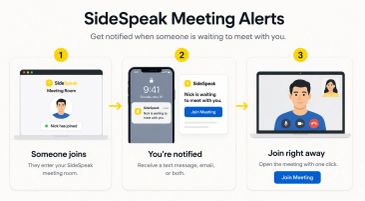
SideSpeak Meeting Alerts makes it easy for clients, coworkers, friends, or family members to let you know when they’re ready to meet—without calling, texting, or emailing you first.
Choose a meeting from your verified SideSpeak history and turn on alerts by text message, email, or both. When someone enters that meeting before you do, Sid
SideSpeak Meeting Alerts makes it easy for clients, coworkers, friends, or family members to let you know when they’re ready to meet—without calling, texting, or emailing you first.
Choose a meeting from your verified SideSpeak history and turn on alerts by text message, email, or both. When someone enters that meeting before you do, SideSpeak notifies you and provides a direct, one-click, link so you can join them right away.
SideThink
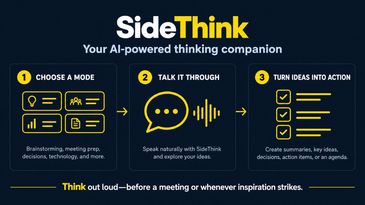
SideThink is your AI-powered thinking companion, available right inside SideSpeak.
Choose a conversation mode and talk naturally as SideThink helps you brainstorm ideas, prepare for a meeting, evaluate decisions, or work through a challenge. When you’re finished, turn the conversation into a summary, key ideas, decisions, action items, or
SideThink is your AI-powered thinking companion, available right inside SideSpeak.
Choose a conversation mode and talk naturally as SideThink helps you brainstorm ideas, prepare for a meeting, evaluate decisions, or work through a challenge. When you’re finished, turn the conversation into a summary, key ideas, decisions, action items, or a ready-to-use agenda.
Access SideThink in the Premium Tools menu.
Who Really Needs to Be in the Meeting?
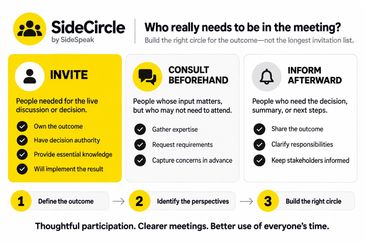
Productive meetings begin with the right people—not the longest invitation list. Learn how to identify who needs to participate in the live conversation, who can provide input beforehand, and who simply needs to receive the outcome afterward.
SideCircle by SideSpeak turns this approach into a simple, guided process. Define the meeting’s p
Productive meetings begin with the right people—not the longest invitation list. Learn how to identify who needs to participate in the live conversation, who can provide input beforehand, and who simply needs to receive the outcome afterward.
SideCircle by SideSpeak turns this approach into a simple, guided process. Define the meeting’s purpose, evaluate each person’s contribution, and build a focused Meeting Circle designed for clearer discussions, better decisions, and more thoughtful use of everyone’s time.
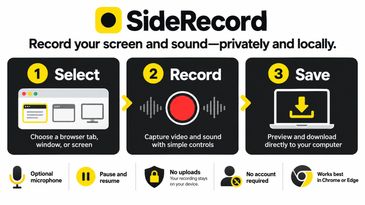
SideRecord - Record Your Screen and Sound
Record a browser tab, application window, or screen with sound, then preview and save it directly to your computer. Your recording remains private and is never uploaded or stored by SideRecord.

SideBar
SideBar makes it easy to have a quick, private conversation with selected people during a larger online meeting.
SideBar works alongside Zoom, Microsoft Teams, and other meeting platforms. Your original meeting remains open while the private conversation takes place in a new browser tab, allowing everyone to return when the sidebar is fin
SideBar makes it easy to have a quick, private conversation with selected people during a larger online meeting.
SideBar works alongside Zoom, Microsoft Teams, and other meeting platforms. Your original meeting remains open while the private conversation takes place in a new browser tab, allowing everyone to return when the sidebar is finished.
Unlike a traditional breakout room, SideBar does not require control of the original meeting or assistance from its host. You decide who joins and when the conversation begins.
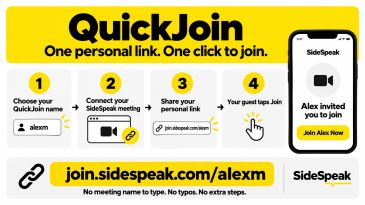
QuickJoin
QuickJoin gives organizers a personalized link that guests can use to join their current SideSpeak meeting—no meeting name to enter, no typos, and no extra steps.
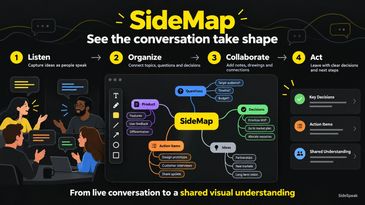
SideMap
SideMap by SideSpeak turns a live conversation into an interactive visual map. As participants talk, SideMap identifies important topics, related ideas, questions, decisions, and action items—then organizes them on a canvas where everyone can see how the discussion is developing.
Access SideMap in the Premium Tools menu.
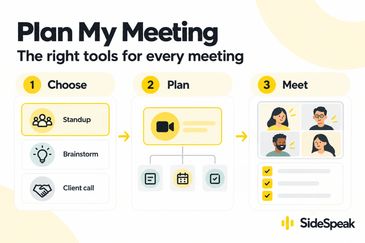
Plan My Meeting
For Premium members,
choose your meeting type and get a focused, best-practice setup using the right SideSpeak tools—before, during, and after your meeting.
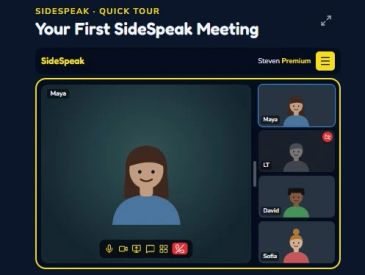
Quick Tour
Explore a quick, self-guided tour of the SideSpeak interface and learn how easy it is to move around and make the meeting view your own.